AGENTIC BACKTESTING
Agentic backtesting. Prove your setup before you risk a dollar.
Replay any day of the market and trade it like it’s live. Ask the agent if your entry holds up — it reads the chart with you, marks the levels, proposes the trade, and shows you what your setup would have made.
The agent on Pro and Ultra · Code and test your setup on Ultra · 14,000+ stocks, futures, forex, and crypto
HOW IT HELPS
Rehearse the trade, then grade it honestly.
Step in on real history; walk out with a review.
- /01Pick a dateChoose any session across 14,000+ instruments and step in at real historical prices.
- /02Ask the agentAsk if your entry holds up. It reads the chart with you, marks the levels, and proposes the trade.
- /03Trade the tapeMarket, limit, stop, and OCO brackets fill the way a live broker would — full OHLC, never close-only.
- /04Read the reviewTen coaching insights and a ten-axis scorecard read the session back to you.
Honest fills
Limits fill at the better of your price and the open; stops at the worse — exactly what a gap does live.
- Daily loss limits
- Max-drawdown circuit breakers
- Risk-based position sizing
Prop rules, enforced
Simulate the account you're trying to pass, not an infinite demo balance.
14,000+ instruments
Stocks, futures, forex, and crypto — with continuous futures that roll and back-adjust themselves.
The what-if review
Every closed trade is marked forward to +1h, +1d, and session end — so you see what holding longer would have done.
WHAT THE AGENT SEES
It sees your chart. It can't see the future.
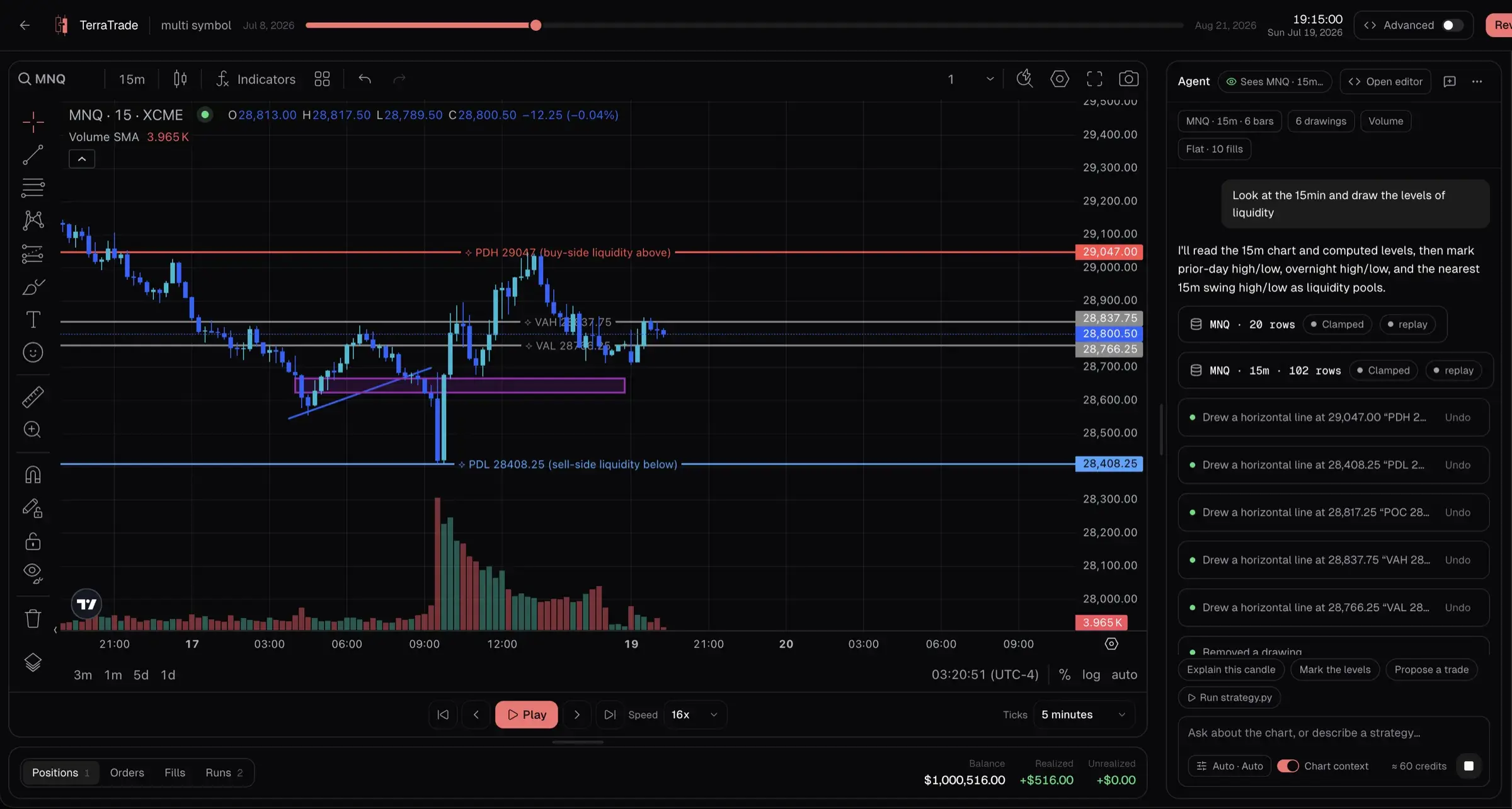
The agent looks at the same chart you do, and only up to where you've replayed. No peeking at the next candle, so its read on your setup is as honest as yours has to be.
- Every candle up to where you are in the replay, on any timeframe
- Your drawings, indicators, open position, orders, and fills
- The levels that matter: yesterday's high, low, and close, the overnight and premarket ranges, the volume POC and value area, and recent swing highs and lows
- It tells you what it looked at before it answers, so you can check its work
- Blind mode stays blind: no dates, no ticker, nothing to jog your memory
ASK IT ANYTHING
Ask “is this a good entry?” Get a straight answer.
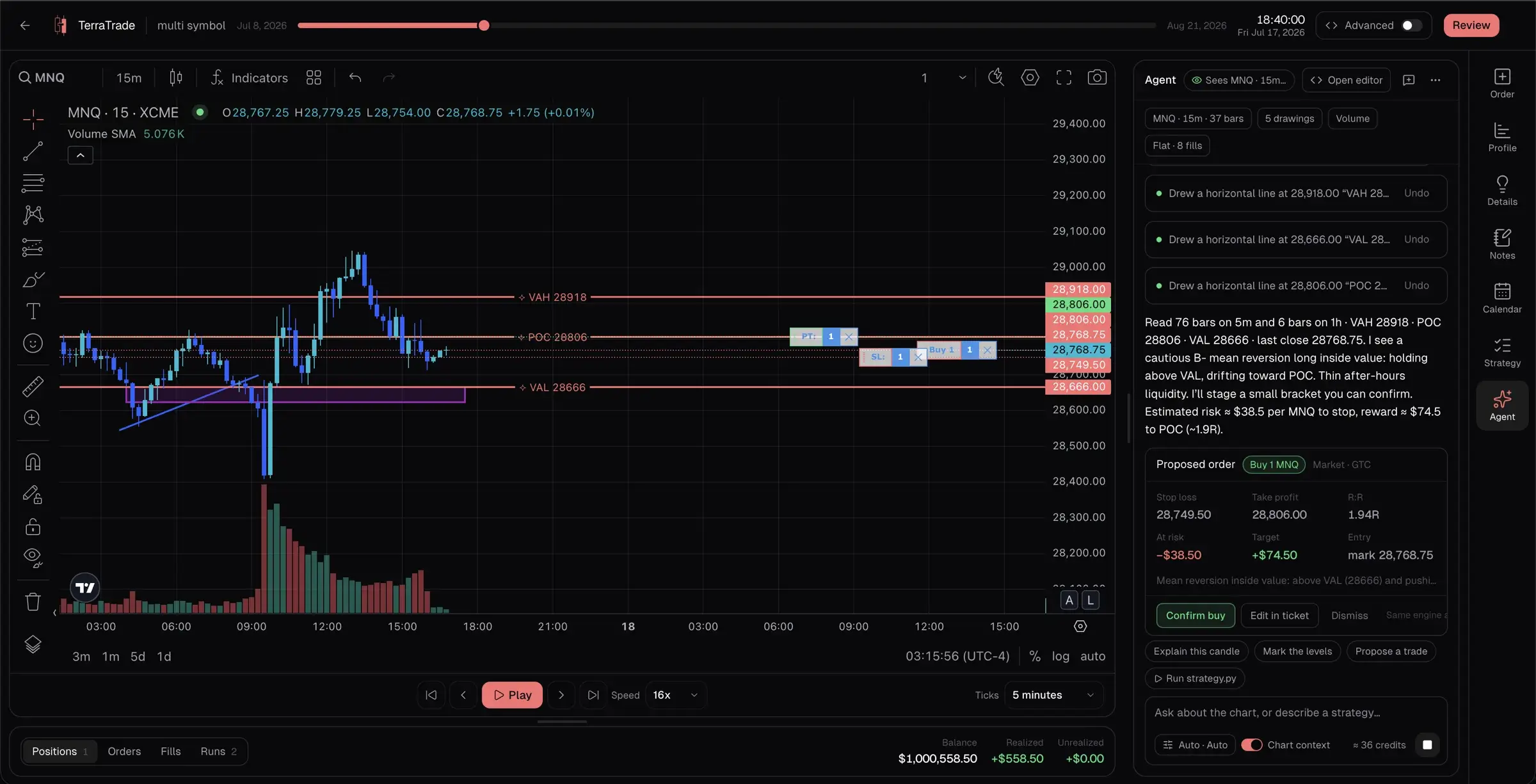
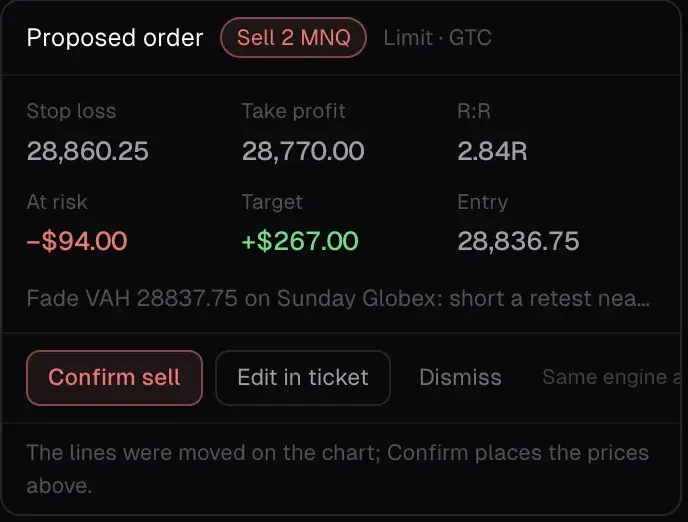
It reads the candles and the levels first and marks them on your chart. If there's a trade, it lays it out for you: entry, stop, target, R:R, and what you'd risk in dollars. You decide. It never takes a trade on its own.
- Marks levels, zones, and trendlines on your chart, tagged ⟡ so you can tell its lines from yours. One tap undoes any of them
- Adds or tweaks your indicators and switches timeframes for you
- Moves the replay forward or back, but only when you say so
- Lays the trade out as a card: confirm it, change it in the order ticket, or dismiss it
- A confirmed trade fills exactly like one you place yourself: same fills, same risk limits
One tap away: Explain this candle, Mark the levels, Propose a trade.
ADVANCED · ULTRA
Turn your setup into rules. See what it would have made.
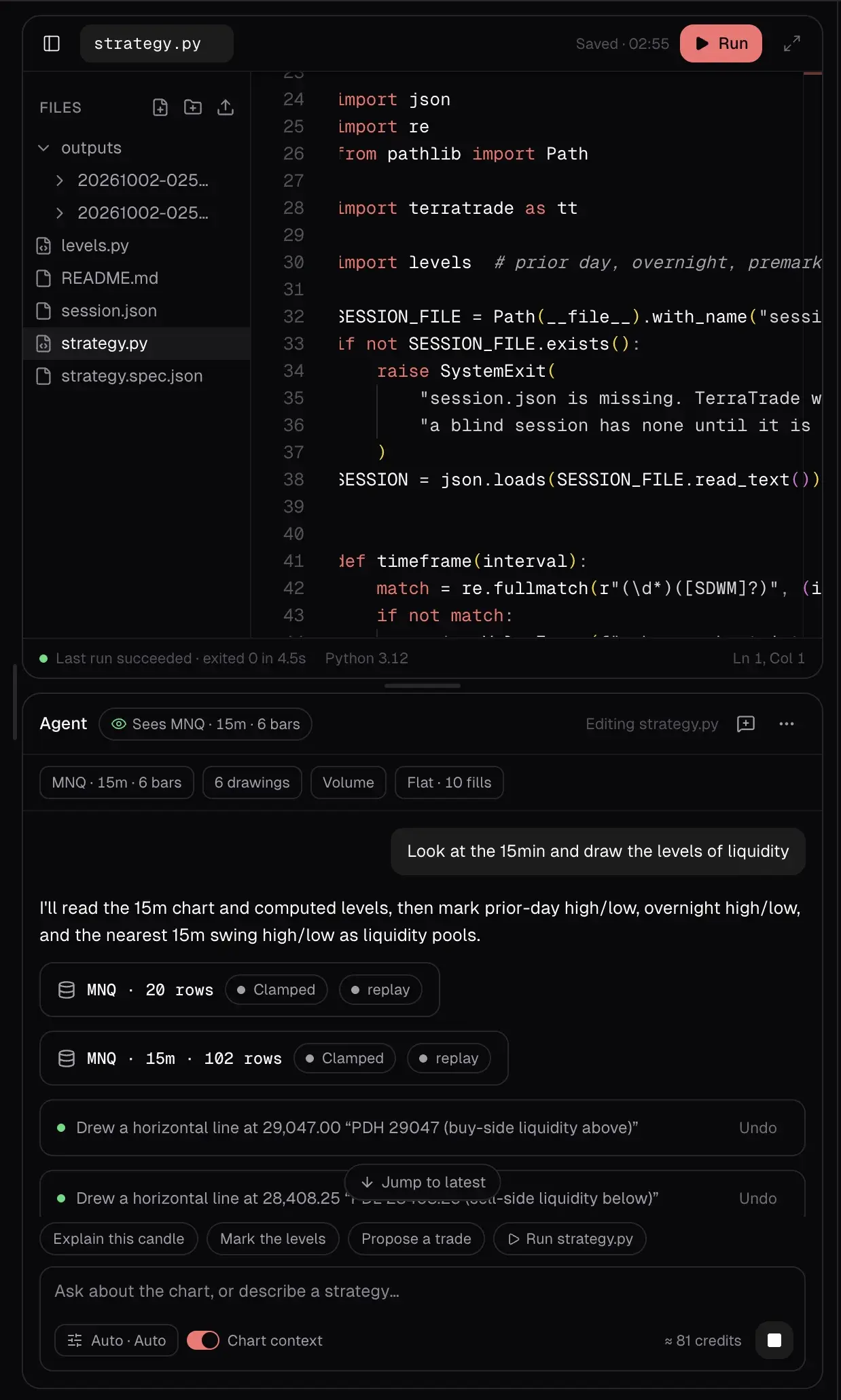
Describe your setup and the agent writes it as code, or write it yourself in Python. Then test it on the days you're replaying and see every trade it would have taken, without it ever looking past where you are.
- It only tests on the part of the market you've already replayed. It can't see the future either
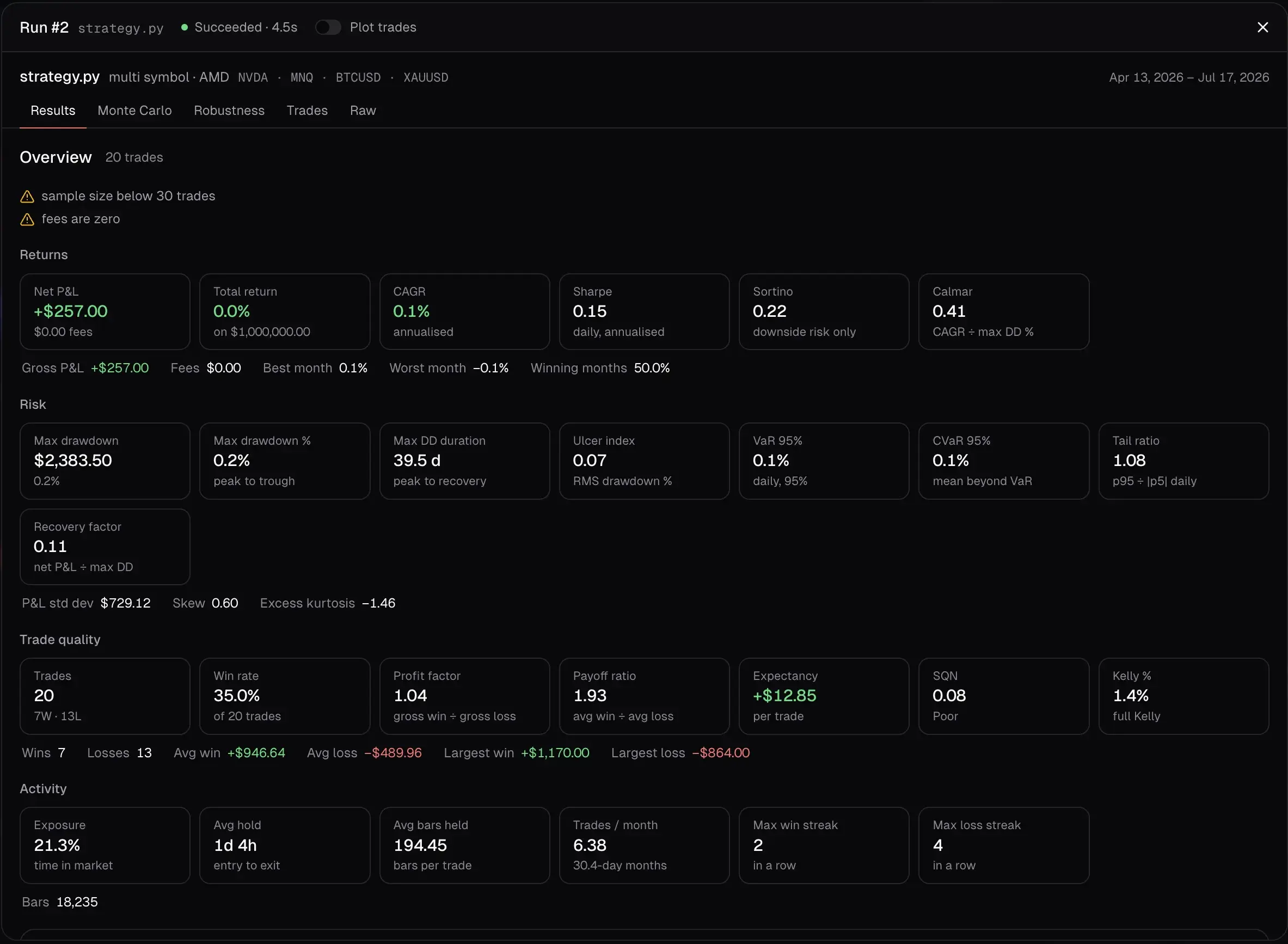
- A Runs tab shows every test: number of trades, net P&L, win rate, profit factor, and biggest drawdown
- Plot the trades on your chart and see every entry and exit
- Open the full report: equity curve, drawdowns, Monte Carlo, and how robust the edge really is
- Blind sessions never run code, because it would give away the ticker and the dates
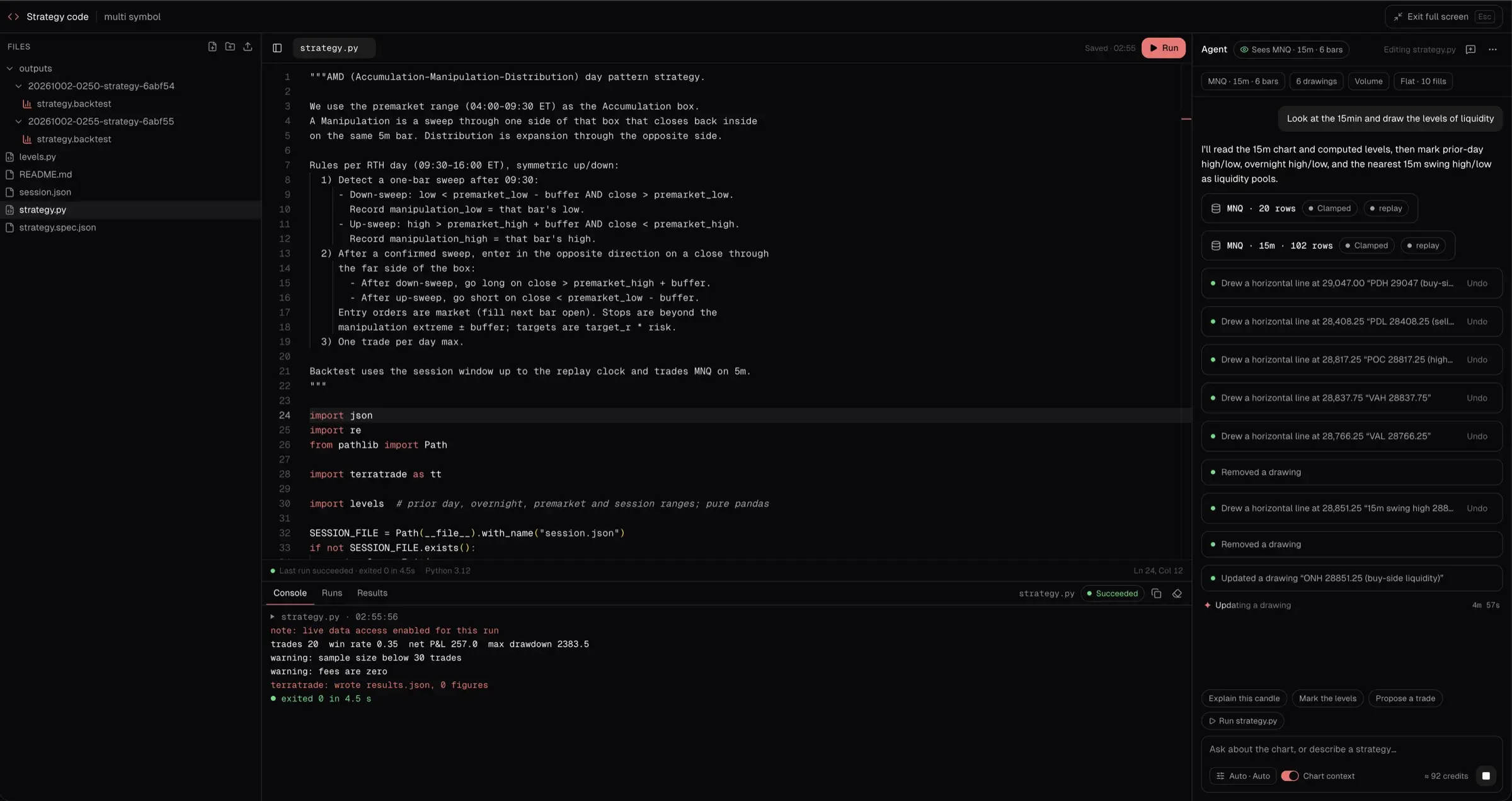
FULL SCREEN
Go full screen when you want to build.
One click turns the page into a coding workspace: your files on the left, the code and its output in the middle, the agent on the right. Your chart stays exactly where you left it. Press Esc and you're back in the replay.
BY PLAN
The agent on Pro. The agent and the code on Ultra.
The agent runs on the same AI credits as TerraAI. No add-on, no separate bill.
Pro
$49/mo
The agent on your chart
- Sees your chart up to where you've replayed: candles on any timeframe, levels, drawings, indicators, positions, orders, and fills
- Marks levels, edits indicators, and switches timeframes
- Proposes trades you confirm, and asks before it moves the replay
- Shows the results of the session's strategy tests
Ultra
$89/mo
The agent, plus code and testing
- Everything in Pro
- Turn your setup into code with the agent
- Test it on the session and see what it would have made: a Runs tab, the full report, and the trades on your chart
- A full-screen coding workspace with the agent beside you
Essential shows the Agent tab with a lock. In blind sessions the agent still helps, but it never runs code, shows no dates, and can’t plot test trades. Compare every plan
THE FILL ENGINE
A simulator that refuses to flatter you.
Most backtesters quietly grade on a curve. This one fills your orders the way a live broker would — which is the only rehearsal worth doing.
- Limits fill at the better of your price and the open; stops at the worse — exactly what a gap does in real markets
- Market orders fill at the next bar’s open — you can never trade a price that already printed
- Full OHLC evaluation on every bar, never close-only triggering
- Stop and target inside one bar? The engine assumes the stop hit first — a pessimistic tie-break you control per session
- Fills only ever see raw contract prices — never back-adjusted ones
RISK
The rules prop firms actually test.
Simulate the account you're trying to pass, not an infinite demo balance.
- Daily loss limits and max-drawdown circuit breakers that block new entries once breached — trailing drawdown included
- Risk-based sizing: give a risk percent or fixed amount and a stop, get the contract quantity
- ATR stops, auto break-even at N×R, and ATR trailing stops evaluated on every replayed bar — watched or not
- Managed stops only ever move in your favor — a trail can never loosen, break-even can never widen risk
- R-multiples stored per trade, so P&L in R is exact — not reconstructed later
THE JOURNAL
Every close becomes a real trade.
Not a CSV of hypotheticals — a journal entry, matched by the same engine that processes your live broker imports.
- Same FIFO matcher as live imports — scale-outs become correctly matched individual trades, not one lump
- Duration, outcome, and excursion computed by the same code as live trades
- A full backtesting sidebar — sessions, dashboard, daily journal, notebook, strategies, reports — sharing ~40 widgets with your live journal
- Permanently walled off: backtest trades can never leak into live stats — the module’s highest-consequence invariant, enforced at the data layer
BLIND MODE
No hindsight. Enforced at the server.
You already know what NVDA did in 2023. Blind replay hides the instrument, the dates, and the absolute price level — so you trade the pattern, not the memory.
- Symbols appear as “Instrument A”, time reads as elapsed, and prices show as offsets you can still trade against
- Redaction happens at the API edge — real values never leave the server, so even devtools can’t peek at what happens next
- Symbol search, compare, go-to-date, and the economic calendar are disabled while blind
- Blind trades stay out of every part of your journal until you reveal — and reveal is one-way
- Blind templates shared to the marketplace are redacted too — browsers see “1 future · 3 days”, never the answer
A CLOSER LOOK
A full trading desk, pointed at the past.
Everything you'd expect at a live desk is in the replay workspace — orders, positions, notes, context, and keyboard speed.
/01
Custom orders
Market, limit, stop, and stop-limit — with OCO brackets and day or GTC time-in-force, evaluated against full OHLC on every bar.
/02
Playback control
Play, pause, and speed multipliers. Tick granularity and chart interval are independent controls, so you can sim in seconds and read in minutes.
/03
Date controller
A scrubber that names any moment on hover and seeks on click. Seeking forward replays every bar in between — a stop you would have hit is never skipped.
/04
Positions & P&L
Live position, unrealized and realized P&L, and balance ride on the tape — the numbers a real desk would show you.
/05
Session details
Starting balance, per-unit commissions, tick settings, and prop rules configured per session — and stored server-side, so a refresh loses nothing.
/06
In-session notes
The journal is embedded in the workspace. Write the note while the bar is still printing, exactly like you should live.
/07
Economic calendar
Event context alongside the tape, so you know whether that spike was FOMC or noise. Disabled in blind mode — no hints.
/08
Risk tools
Position sizing from risk, ATR stops, auto break-even, trailing stops, and circuit breakers — the full risk section below.
/09
Keybinds
Keyboard-first order entry and playback, because the moment you rehearse for will not wait for your mouse.
AFTER THE BELL
The session reads itself back to you.
Close the session and it grades you: exactly what holding longer would have made, coaching on your habits, and a scorecard compared with your live trading.
SCORECARD — REPLAY VS LIVE · LAST 90 DAYS
PRACTICE
Drills, templates, and receipts.
Rehearsal only counts if it's targeted, repeated, and honest. All three are built in.
Deliberate-practice drills
TerraTrade finds your worst trades, scans months of history for setups that look like them — scale-invariant shape matching, not nearby prices — and turns the lookalikes into blind drills. 28 seed sources: your worst trades plus 27 named habits.
Spaced repetition
Revealing a drill auto-grades it by R-multiple into an SM-2 schedule — the same algorithm flashcard apps use. A Due page surfaces exactly the reps scheduled for today. Setups you remember are excluded: that would be a memory test.
Templates & marketplace
Package symbols, balance, tick, and risk rules as a template — fixed windows for shared studies, or seeded relative windows that draw unseen history yet replay identically for everyone who forks them. The marketplace shows setups, never track records.
Shareable session reports
Send anyone a read-only session link — no account needed. Nine independently toggleable sections, 128-bit unguessable tokens, links that expire and revoke, view counts for you. Unticked sections are never serialized.
UNDER THE HOOD
Built like an exchange, tested like one.
The parts you'll never click on — and would miss immediately anywhere else.
✶TERRAAI IN SESSION
TerraAI reads the session back.
TerraAI sits beside the replay the same way it sits beside your live journal — and every number it cites is computed, never imagined.
The market already wrote the answer key.
Pick a market, pick a day, and trade it with the agent beside you until your setup is proven — or you find out it isn't. 10 sessions, 10 strategies, and 3 templates on Essential; unlimited on Pro and Ultra, with the agent.
Essential $29/mo · Pro $49/mo · Ultra $89/mo · Cancel anytime